Building a Research Platform API: Lessons from Going API-First
How we designed Synthesize Labs as an API-first platform, enabling white-label integrations, custom workflows, and programmatic research at scale.
Summary
When we set out to build Synthesize Labs, we made a critical architectural decision early on: design the platform API-first from day one. This meant every feature, every capability, every piece of functionality would be accessible through a well-designed REST API before we even thought about the UI. This post shares the technical decisions, trade-offs, and lessons learned from building a research platform where the API isn't an afterthought—it's the foundation.
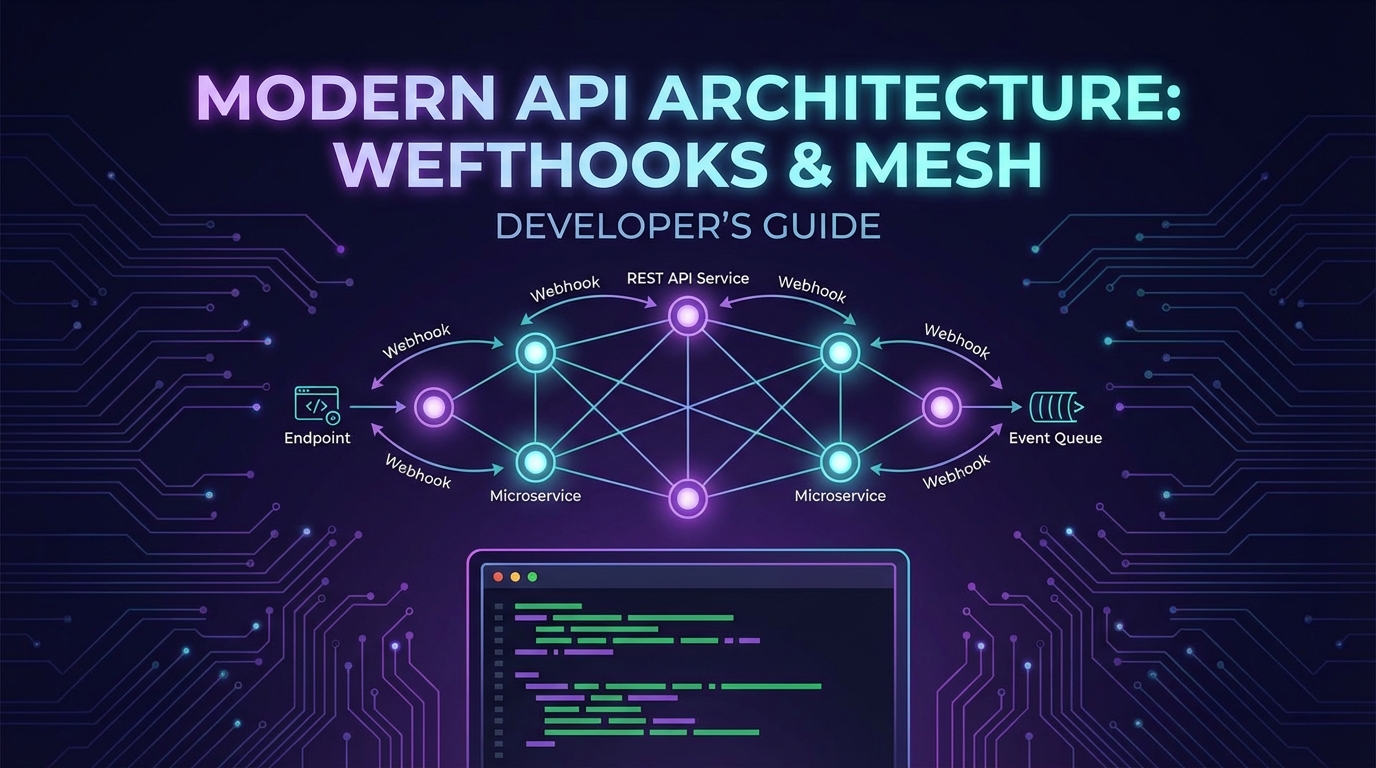
We'll explore why API-first architecture matters for research platforms, the design principles behind our REST endpoints, how we implemented a comprehensive webhook event system, and the white-label use cases that emerged once research agencies and teams could programmatically control AI interviews. Whether you're building a research tool or any SaaS platform that needs to integrate deeply with customer workflows, these lessons apply.
Why API-First Architecture Matters for Research Platforms
Traditional research tools are built UI-first, then APIs are bolted on later for "power users" or enterprise customers. This creates a fundamental mismatch: the UI can do things the API cannot, the API has inconsistencies because it wasn't part of the original design, and integration becomes a painful afterthought.
For a modern research platform, this approach fails for several reasons:
Research workflows are diverse. Every organization has unique processes. Some need to trigger interviews from CRM events. Others want to embed research into their support ticketing system. Product teams want automated follow-ups after feature launches. An API-first approach means these workflows aren't hacks—they're first-class use cases.
Scale requires automation. Running 10 interviews manually works fine. Running 1,000 interviews per month requires programmatic control. Our customers needed to create participants in bulk, trigger interviews automatically, and process results without touching a UI. Building the API first meant scaling wasn't a rewrite—it was just using the platform as designed.
White-label integrations demand consistency. Research agencies want to offer AI interviews under their own brand, embedded in their own tools. This requires not just API access, but API-first thinking where authentication, data isolation, and customization are core architectural concerns, not features added later.
The decision to go API-first meant more upfront planning, but it paid dividends. Every feature we built for the dashboard automatically worked in the API because the dashboard used the same API. This architectural constraint forced better design decisions and created a platform that's fundamentally more flexible.
REST API Design: Endpoints and Resources
Our REST API is organized around five core resources: projects, interviews, participants, insights, and events. Each resource follows consistent patterns for listing, creating, retrieving, updating, and deleting—standard REST conventions that developers expect.
Project Endpoints
Projects are the top-level container for research activities. The endpoints reflect this hierarchy:
// Create a new research project
POST /api/v1/projects
{
  "name": "Q1 Product Feedback Study",
  "description": "Understanding user pain points with checkout flow",
  "interviewGuide": {
    "introMessage": "Thanks for participating...",
    "questions": [...]
  }
}

// List all projects with pagination
GET /api/v1/projects?page=1&limit=20

// Retrieve a specific project
GET /api/v1/projects/{projectId}

// Update project configuration
PATCH /api/v1/projects/{projectId}
{
  "interviewGuide": {...}
}
The project endpoint design prioritized composability. Rather than requiring all configuration upfront, projects can be created minimally and enriched over time. This matches how research actually works—you start with a hypothesis, refine your interview guide, adjust targeting criteria.
Interview and Participant Endpoints
Interviews and participants have a many-to-many relationship: one participant can complete multiple interviews, and one interview configuration can be deployed to many participants. The API reflects this flexibility:
// Create a participant
POST /api/v1/participants
{
  "email": "user@example.com",
  "metadata": {
    "plan": "enterprise",
    "signupDate": "2025-08-15",
    "segment": "power-user"
  }
}

// Trigger an interview for a participant
POST /api/v1/interviews
{
  "projectId": "proj_abc123",
  "participantId": "part_xyz789",
  "scheduledFor": "2025-09-15T10:00:00Z",
  "customization": {
    "brandColor": "#4F46E5",
    "logoUrl": "https://example.com/logo.png"
  }
}

// Get interview results
GET /api/v1/interviews/{interviewId}
One design decision we debated extensively: should metadata on participants be freeform JSON or structured fields? We chose freeform JSON because every organization segments users differently. Some care about subscription tier, others about geographic region, others about feature adoption stage. Allowing arbitrary metadata meant the API could adapt to any customer's data model without schema changes.
Insights Endpoints
The insights endpoints are where API-first design really shines. Rather than forcing users to log into a dashboard to see themes and patterns, insights are queryable programmatically:
// Extract insights from completed interviews
GET /api/v1/projects/{projectId}/insights
{
  "insights": [
    {
      "theme": "Checkout friction",
      "sentiment": "negative",
      "frequency": 47,
      "quotes": [...]
    }
  ]
}

// Get aggregated sentiment analysis
GET /api/v1/projects/{projectId}/sentiment
{
  "overall": 3.2,
  "trend": "improving",
  "breakdown": {...}
}
These endpoints enable downstream automation. A product manager can set up a daily Slack notification with top insights. A data team can pipe interview results into their warehouse. A support team can trigger alerts when negative sentiment crosses a threshold. The API makes research data as accessible as any other operational data.
Webhook Event System Design
APIs let you pull data. Webhooks let the platform push data to you. For research workflows, webhooks are essential: you want to know the moment an interview completes, when a participant responds, when insights are extracted. Building a robust webhook system required careful design decisions.
Event Types and Payloads
We defined a comprehensive event taxonomy covering the full interview lifecycle:
// Interview lifecycle events
interview.created
interview.scheduled
interview.started
interview.completed
interview.failed

// Participant events
participant.created
participant.updated
participant.responded

// Insight events
insights.generated
sentiment.analyzed

// Project events
project.created
project.updated
project.deleted
Each webhook payload follows a consistent structure:
{
  "eventId": "evt_unique123",
  "eventType": "interview.completed",
  "timestamp": "2025-09-10T14:30:00Z",
  "data": {
    "interviewId": "int_abc123",
    "projectId": "proj_xyz789",
    "participantId": "part_def456",
    "duration": 847,
    "transcript": [...],
    "insights": [...]
  }
}
Delivery Guarantees and Retry Logic
Webhook reliability is non-negotiable. We implemented several layers of resilience:
Exponential backoff retries: If your endpoint is temporarily down, we retry with increasing delays: 10 seconds, 1 minute, 10 minutes, 1 hour, up to 24 hours. This handles transient network issues and brief outages.
Idempotency keys: Every webhook includes an eventId. If we retry delivery, you can deduplicate using this ID. This prevents double-processing of events.
Signature verification: Each webhook is signed with an HMAC signature using your secret key. You verify the signature to ensure the webhook genuinely came from Synthesize Labs, not an attacker:
const crypto = require('crypto');

function verifyWebhookSignature(payload, signature, secret) {
  const hmac = crypto.createHmac('sha256', secret);
  const digest = hmac.update(payload).digest('hex');
  return crypto.timingSafeEqual(
    Buffer.from(signature),
    Buffer.from(digest)
  );
}

app.post('/webhooks/synthesize', (req, res) => {
  const signature = req.headers['x-synthesize-signature'];
  const isValid = verifyWebhookSignature(
    JSON.stringify(req.body),
    signature,
    process.env.WEBHOOK_SECRET
  );

  if (!isValid) {
    return res.status(401).json({ error: 'Invalid signature' });
  }

  // Process webhook event
  const { eventType, data } = req.body;
  // Handle event...

  res.status(200).json({ received: true });
});
Event logs and manual replay: In the dashboard, you can view all webhook deliveries, see response codes, and manually replay failed events. This was a feature request from early customers who needed to reprocess events after fixing bugs in their webhook handlers.
White-Label Use Cases
Once the API and webhook system were in place, white-label use cases emerged that we hadn't fully anticipated. Research agencies, consulting firms, and enterprise teams wanted to embed AI interviews into their own tools under their own brand.
Research Agency Integration
A user research agency used our API to create a custom client portal. When their clients request interviews, the portal calls our API to create projects, participants, and schedule interviews—all without the end users knowing Synthesize Labs exists. The interviews are branded with the agency's logo and colors using the customization parameters in the API.
Their workflow:
- Client uploads participant list to agency portal
- Portal calls
POST /api/v1/participantsin bulk - Portal triggers interviews with custom branding
- Webhooks notify portal when interviews complete
- Portal displays insights in their custom dashboard
This generates revenue for the agency while letting them offer cutting-edge AI research capabilities without building the technology themselves.
Product Team Automation
A B2B SaaS company embedded interview triggers into their product. When a user completes onboarding, their backend calls our API to create a participant and schedule a follow-up interview 7 days later. When the interview completes, a webhook triggers a Slack notification to the product team.
// After user completes onboarding
async function scheduleFollowUpInterview(user) {
  // Create participant
  const participant = await synthesizeAPI.createParticipant({
    email: user.email,
    metadata: {
      userId: user.id,
      plan: user.subscription.plan,
      features: user.enabledFeatures
    }
  });

  // Schedule interview for 7 days from now
  const interview = await synthesizeAPI.createInterview({
    projectId: ONBOARDING_FEEDBACK_PROJECT,
    participantId: participant.id,
    scheduledFor: addDays(new Date(), 7)
  });

  return interview;
}
This closes the feedback loop automatically. The product team gets rich qualitative data at scale without manual interview coordination.
Support Ticket Integration
A customer success team integrated Synthesize Labs with Zendesk. When a support ticket is tagged "escalated," a webhook to our API creates a participant and sends an interview link. The interview explores the issue in depth, and the transcript is automatically appended to the Zendesk ticket.
This turns every escalated support case into a mini research session, surfacing patterns and product gaps that CSV exports and quantitative metrics miss.
Authentication and Rate Limiting
An API-first platform requires robust authentication and rate limiting. We implemented both with developer experience in mind.
API Key Authentication
Authentication uses API keys with configurable scopes:
// API key in header
Authorization: Bearer sk_live_abc123xyz789

// Scoped permissions
{
  "key": "sk_live_abc123xyz789",
  "scopes": [
    "projects:read",
    "projects:write",
    "interviews:read",
    "interviews:write",
    "webhooks:manage"
  ]
}
Scoped keys let you follow least-privilege principles. A webhook handler only needs read access, so you generate a read-only key. An integration that creates interviews needs write access to specific resources.
We provide separate test and production keys (sk_test_* and sk_live_*), so you can develop and test integrations without affecting production data.
Rate Limiting Strategy
We implemented tiered rate limits based on subscription level:
- Free tier: 100 requests per hour
- Pro tier: 1,000 requests per hour
- Enterprise tier: 10,000 requests per hour, custom limits available
Rate limit headers in every response tell you where you stand:
X-RateLimit-Limit: 1000
X-RateLimit-Remaining: 847
X-RateLimit-Reset: 1694361600
When you hit the limit, the API returns 429 Too Many Requests with a Retry-After header indicating when you can resume.
For bulk operations, we implemented batch endpoints that count as a single request but process multiple items:
// Batch create participants
POST /api/v1/participants/batch
{
  "participants": [
    { "email": "user1@example.com", ... },
    { "email": "user2@example.com", ... },
    // up to 100 participants
  ]
}
This dramatically reduces API calls for common bulk workflows like importing participant lists.
Practical Integration Examples
Here are real-world integration patterns our customers have built:
CRM Trigger Integration
Trigger interviews when deals reach specific stages in your CRM:
// Salesforce webhook handler
app.post('/webhooks/salesforce', async (req, res) => {
  const { opportunityId, stage, contactEmail } = req.body;

  if (stage === 'Closed Won') {
    // Create participant and trigger success interview
    const participant = await synthesizeAPI.createParticipant({
      email: contactEmail,
      metadata: { opportunityId, stage }
    });

    await synthesizeAPI.createInterview({
      projectId: WIN_FEEDBACK_PROJECT,
      participantId: participant.id,
      scheduledFor: new Date()
    });
  } else if (stage === 'Closed Lost') {
    // Trigger loss interview
    const participant = await synthesizeAPI.createParticipant({
      email: contactEmail,
      metadata: { opportunityId, stage }
    });

    await synthesizeAPI.createInterview({
      projectId: LOSS_FEEDBACK_PROJECT,
      participantId: participant.id,
      scheduledFor: new Date()
    });
  }

  res.status(200).json({ processed: true });
});
Automated Reporting Pipeline
Build a daily insights report that posts to Slack:
const cron = require('node-cron');

// Run every day at 9 AM
cron.schedule('0 9 * * *', async () => {
  const yesterday = addDays(new Date(), -1);

  // Get completed interviews from yesterday
  const interviews = await synthesizeAPI.listInterviews({
    completedAfter: yesterday,
    limit: 100
  });

  // Aggregate insights
  const insights = await synthesizeAPI.getInsights({
    projectId: ONGOING_PROJECT,
    since: yesterday
  });

  // Post to Slack
  await slack.postMessage({
    channel: '#product-feedback',
    text: `Daily Research Update:\n
    - ${interviews.length} interviews completed\n
    - Top insight: ${insights[0].theme} (${insights[0].frequency} mentions)\n
    - Overall sentiment: ${insights.sentiment}`
  });
});
Custom Analysis Pipeline
Export interview data to your data warehouse for custom analysis:
// Triggered by webhook when interview completes
app.post('/webhooks/interview-complete', async (req, res) => {
  const { interviewId, transcript, insights } = req.body.data;

  // Transform data for warehouse schema
  const record = {
    interview_id: interviewId,
    completed_at: new Date(),
    transcript_text: transcript.map(t => t.text).join('\n'),
    sentiment_score: insights.sentiment,
    themes: insights.map(i => i.theme)
  };

  // Insert into warehouse
  await snowflake.insert('research_interviews', record);

  res.status(200).json({ received: true });
});
Key Takeaways
-
API-first design forces better architecture. Building the API before the UI creates consistency, prevents feature drift between dashboard and programmatic access, and ensures integration is a first-class concern from day one.
-
Webhooks are essential for research workflows. Real-time notifications when interviews complete, participants respond, or insights are generated enable automation that polling-based APIs cannot support efficiently.
-
White-label capabilities emerge naturally from good API design. Once the API handles authentication, data isolation, and customization, white-label integrations become straightforward—agencies and teams can embed your platform under their brand.
-
Developer experience details matter. Consistent error messages, comprehensive documentation, test environments with separate API keys, and rate limit headers in responses all contribute to an API that developers enjoy using rather than fight against.
-
Batch endpoints and flexible metadata prevent API limitations. Allowing freeform metadata on resources and providing batch operations for common tasks means the API adapts to diverse customer workflows without requiring constant schema changes or inefficient request patterns.
Synthesize Labs offers a full REST API with webhooks for every event. Embed AI interviews into your own product. Learn more.
Written by Synthesize Labs Team
Published on September 10, 2025